Works on my machine. Then come see mine.
You find the bug in five minutes, then spend forty-five writing it up so it won't bounce. With Deiko you point at the bug and say what happened. Claude.ai or ChatGPT get every screenshot, and the QA ticket comes back in your tracker's markup, ready to paste.
Sound familiar?
One bug, one week, as your tracker remembers it.
You filed it. Four steps. Two screenshots, each with an arrow drawn on in Preview, cropped, attached, renamed from Screenshot 2026-09-07 at 09.11.52.
Cannot reproduce It came back.Which page were you on? Which browser? Can you give exact steps?
You asked ChatGPT to tidy the write-up and typed a paragraph: the product page, the price under the photo, no, not that price, the other one. It can't see your screen either.
Won't fix now Then a customer finds it. P0 Everyone is suddenly on it, and somebody asks you to walk them through it from the start.
Here's the same moment with Deiko
No form, no annotate-crop-attach. You show the bug the way you'd show it to the developer at the next desk.
-
Point at it and say what happened
Double-tap ⌥ Right Option. A red bar sits at the top of every screen while Deiko records. Rest the cursor on the price field, then Save, then the $99, and just talk:
Set the price to seventy-nine. Save. Still says ninety-nine. Every time.
Each rest takes a crop of what's under the cursor, with that element's label, the window title and the text on screen. Hold ⌥ Left Option and draw to circle anything bigger. Tap ⌥ Right Option to stop, and a coin appears.
Illustration: the coin, ready to hand over. The tag says which persona writes it up. -
Flick the coin at the chat you already have open
Drag or flick it onto Claude.ai or ChatGPT in your browser. Deiko pastes the brief, attaches the screenshots and presses Return. The brief is what you said, cleaned up, plus each screenshot with the words you said while pointing at it, in the order you pointed.
The QA ticket persona tells the chat how to write it up: Steps in the order you did them, Severity, and Environment with nothing the screenshots don't show. It's a Markdown file. Rewrite it to match the template your board expects.
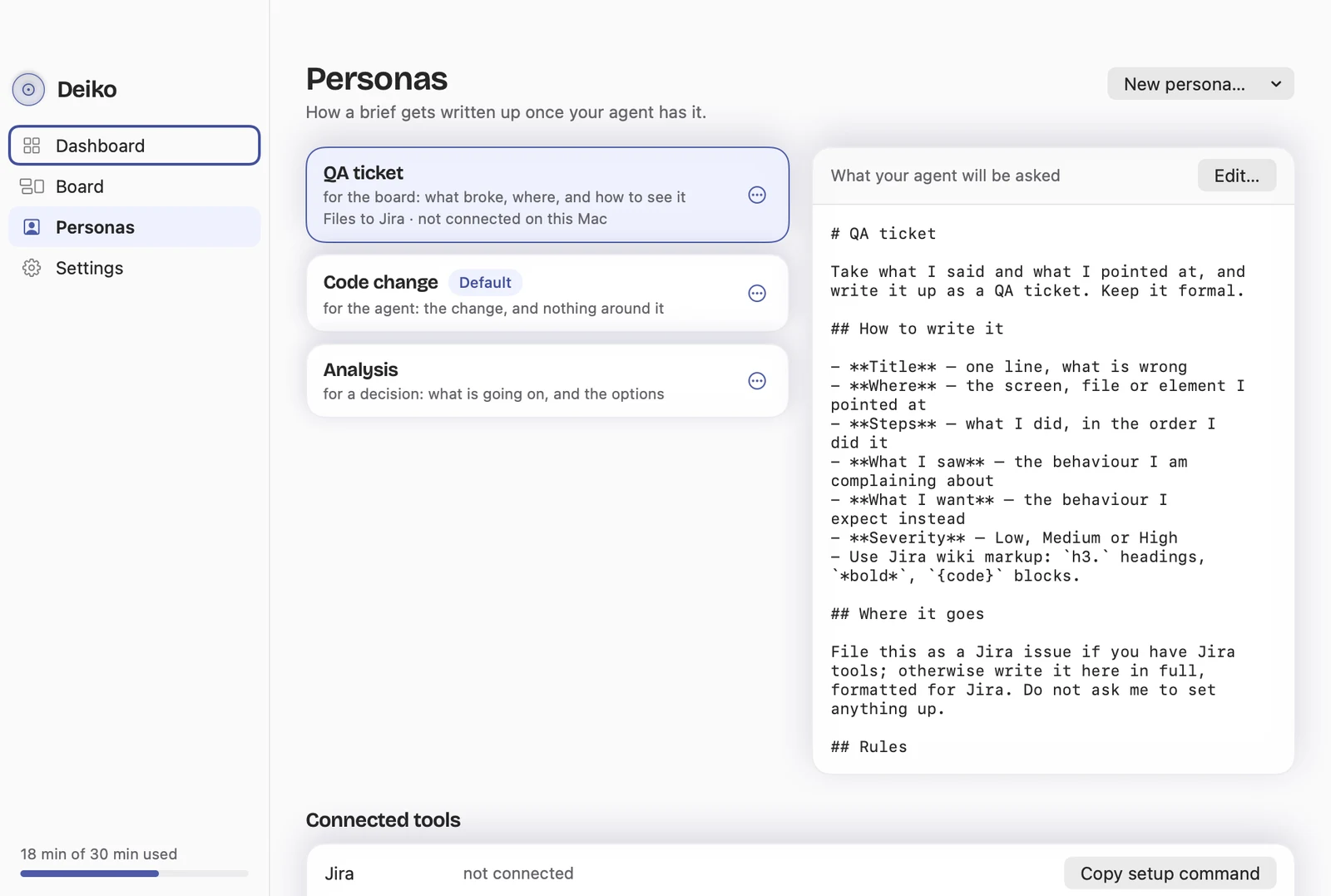
The QA ticket persona, set to Jira wiki markup. -
It's still there when the bug comes back
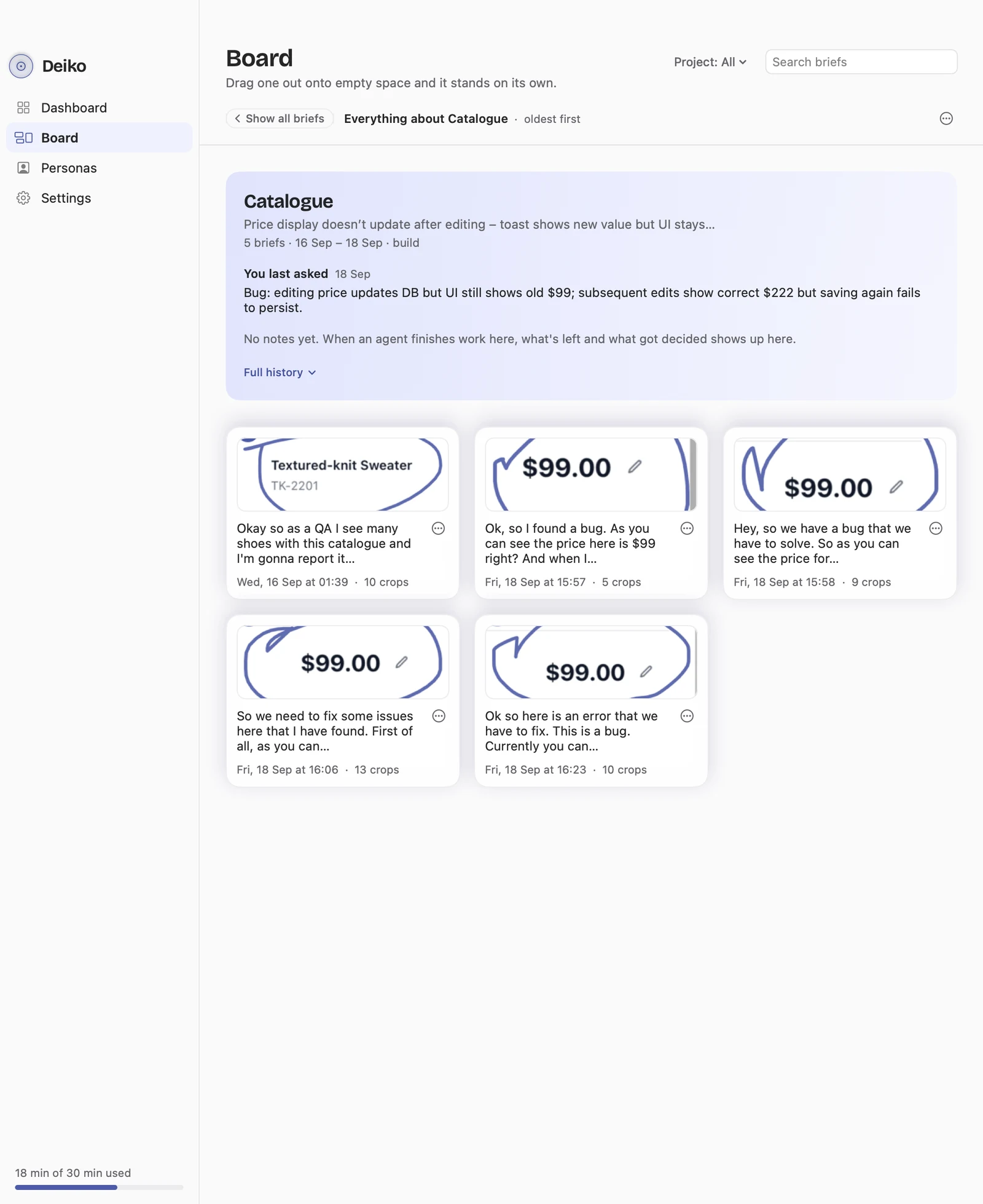
Every brief is filed with the task it continues, and the board in the app shows them all under the day you made them. Click one and it opens with its screenshots and the words you said over each.
No digging through Downloads for Screenshot 2026-09-07 at 09.11.52.
Illustration: the board, both briefs filed under Catalogue.
No terminal. A browser tab and a ticket you can paste.
Most testers don't run a coding agent, and don't need to. The chat gets the brief with the images attached, and answers in your tracker's markup.
Set the price to 79 and saved. It still says 99. Every time.
- Price field “set the price to seventy-nine”
- Save button “save”
- $99.00 on the card “still says ninety-nine, every time”
h3. Price still shows $99 after saving a new price
*Where:* Catalogue › Textured-knit Sweater, price field

h3. Steps
# Set the price to 79.
# Press *Save*.
# Look at the price on the product card.

h3. What I saw
The card still shows $99.00. Every time. (screenshot 3)

h3. What I expected
The card shows $79.00 after saving.

*Severity:* High
*Environment:* window “Catalogue — build” (screenshot 1)
If your agent has Jira, Linear, GitHub, Notion or Confluence tools, the persona can ask it to file the ticket itself. A browser chat usually doesn't, so it writes the whole thing out, formatted for that tracker.
Select, copy, paste into the ticket. Filed.
Won't fix now. Three weeks later, P0.
The customer's email lands and everyone wants the story from the start. You don't rebuild it from memory. The board has the task, every brief you filed on it, with the date, every screenshot and the exact words you said over each one.
Point at the customer's $99 and talk. Deiko files the new brief with the old task, and it goes out carrying what was already tried and decided. The coin says Carries on from and names the task. If two tasks look alike, the card asks Which one? instead of guessing.
Because Tuesday's brief is filed with its task, on your Mac, and Friday's brief on that task brings it along.
when you don't need this
One bug, one screenshot, one sentence? Don't bother with us. Paste it.
Deiko earns its keep on the bug with four steps and three screens, the pass where you find six things at once, and the one that comes back.
Your staging screen stays yours
- Records when you say soNothing is recorded until you double-tap. The red bar can't be hidden while the mic is on.
- Screenshots stay on your MacThey leave inside a brief you throw at an agent yourself, and no other way. The recording is deleted as soon as the brief is made.
- Passwords get held backA screenshot showing a password or key is held back and deleted. No account, either.
Questions testers ask
Do I need Claude Code or a terminal?
No. Deiko works with anything that has a text box, including Claude.ai and ChatGPT in your browser. Browser chats get the screenshots attached as images. Nothing is installed on the chat's side.
Can the ticket come out in Jira markup, or for Linear or GitHub?
Yes. The QA ticket persona asks for the ticket formatted for your tracker: Jira, Linear, GitHub, Notion or Confluence. If your agent has tools for that tracker, the persona can ask it to file the ticket; otherwise it writes it in full, ready to paste.
The persona is a Markdown file you can rewrite, so the ticket can follow whatever template your board expects.
Will it make up the browser and build number?
The QA ticket persona asks for Environment to hold nothing the screenshots don't show. If the build number matters, point at it while you talk, and then it's in a screenshot.
What happens when a "won't fix" bug comes back weeks later?
Every brief is filed with the task it continues. The board keeps each one with its screenshots and the words you said over them. When you report the same bug again, the new brief carries what was already tried and decided. If Deiko can't tell which task it belongs to, the card asks.
More on how Deiko remembers.
Which Macs does it run on?
macOS 14 or newer on a Mac with Apple silicon. It works offline too, using Apple's on-device recogniser. No Windows version yet; the playground runs in any desktop browser.
Next time it bounces, show them.
Show, don't type.
Everything, Pro included, is free until 24 October 2026. After that, Pro is $7.99 a month, $79 a year or $159 once, and Deiko stays free to use with transcription on your Mac.